
June 3, 2026 · 6 min read
Your LinkedIn Feed Is Broken. Here's How to Fix It.
LinkedIn buries the posts that matter under engagement bait. Here's how to take back your feed and turn aimless scrolling into intentional minutes.
You open LinkedIn to reach thirty people who matter. You leave having read forty strangers’ hot takes. That isn’t you. That’s the feed.
Key Takeaways
- In 2026, more than a third of your feed comes from people you never connected with or followed. Posts from your direct connections fell from 72% of the feed in 2024 to just 31% (Algorithm Insights Report 2026, Richard van der Blom)
- The average user gets about 7 minutes a day on LinkedIn (DataReportal). The feed wastes most of them.
- You can claw back control with native settings, but LinkedIn caps how far you can curate. That ceiling is the whole problem.
The average person spends about seven minutes a day on LinkedIn (DataReportal). Seven. This isn’t a platform people open to kill time. It’s one they check, fast, between real work.
So why does it take forty minutes to find the five posts you actually wanted to see?
Because the feed wasn’t built for you. It was built for the platform. Here’s why your feed is so noisy, what you can fix today, and where LinkedIn quietly stops you.
Why is your LinkedIn feed so noisy?
Because LinkedIn stopped building your feed around who you know and started building it around what it thinks you want. In 2024, 72% of what you saw came from your direct connections. By 2026 that is down to 31%, while posts from people you have never connected with (second and third degree) climbed to 25%, and purely algorithmic “Suggested Posts” to another 10% (Algorithm Insights Report 2026, Richard van der Blom). More than a third of your feed now comes from strangers the algorithm picked for you.
The feed rewards whatever keeps people on the platform. It rewards engagement bait. It rewards the post engineered to provoke a reply. It rewards the viral take from someone you have never met. It does not reward the quiet update from the prospect you have been nurturing for six months.
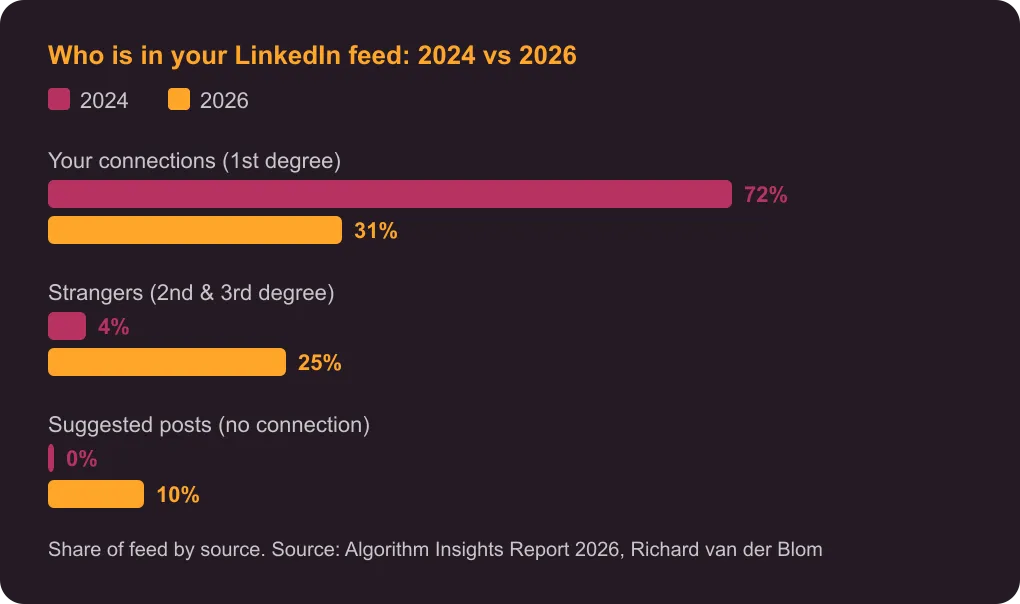
This is not a glitch. A feed engineered for relevance as LinkedIn defines it will always bury relevance as you define it. Your connections are competing for space with whatever the algorithm thinks will keep you scrolling, and they are losing.
That same shift has a creator side: the graph that decides what you see also decides what you are known for.
What a feed worth opening actually looks like
A feed worth opening is small, chronological, and built from the people who move your business. Call it 100 to 200 names: prospects, customers, peers, and the handful of voices actually worth learning from. Everything else is noise you are paying for in minutes.
Here is the uncomfortable part. Your feed is not broken. It’s working exactly as designed. Just not for you. The default feed assumes you want reach-maximizing content. What you actually want is a short, current list of the right people, in order. Those are two different products. LinkedIn only ships the first one.
So the question is not “how do I make the feed less annoying?” It’s “how do I see the right twenty posts and skip the rest?”
How to fix your LinkedIn feed today
You can recover real control in about ten minutes with native settings. Up to a point.
Here is what works:
- Sort by “Recent,” not “Top.” At the top of your feed, the “Sort by” control switches the order from algorithmic to chronological. Instantly less viral noise.
- Unfollow, don’t disconnect. You can unfollow a noisy connection without removing them. You stay connected; their posts leave your feed.
- Mute the serial reposters. One person resharing ten things a day can dominate everything you see. Mute them.
- Use “I don’t want to see this.” The control on each post teaches the feed what to drop. It is slow, but it compounds.
- Keep a manual short-list. Bookmark the profiles that matter and check them directly, in order, instead of trusting the feed to surface them.
And here is the ceiling. LinkedIn does not hold your “Recent” setting for long; it resets you to “Top.” It keeps re-injecting suggested posts you never asked for. There is no native way to save a chronological feed of only the people you chose. You can reduce the noise. You cannot make the feed yours.
That gap, between a feed you tolerate and a feed you own, is exactly where a curated, chronological feed of the people who matter comes in. It’s also why some teams reach for engagement-first tools over publishing-first ones. The fix that lasts is to build your feed from a shortlist you control, not one the algorithm hands you.
From a clean feed to real pipeline
A clean feed is the setup. The payoff is showing up where it counts. LinkedIn’s engagement system weighs 12 real comments more heavily than 200 likes (Algorithm Insights Report 2026, Richard van der Blom).
That’s the whole reason to fix the feed. Not to scroll calmer. To see the posts worth commenting on, from the people worth reaching, and show up in the right comments before you ever send a pitch. LinkedIn is the channel 89% of B2B marketers use for lead generation (Sopro, 2025). Being visible in the right conversations is how that pipeline starts.
You can’t perform better on LinkedIn if you can’t see the right posts. The tactics above buy back some control. The honest truth is they only go so far, because the default feed was never meant to be yours.
So decide what you want LinkedIn to be. A place you check for seven minutes and leave a little dumber. Or a short, current list of the people who move your business, in order, ready to engage. The platform hands you the first one by default. The second one you have to build.
Frequently Asked Questions About Fixing Your LinkedIn Feed
Why is my LinkedIn feed so bad?
Because it is optimized for the platform's engagement, not your goals. LinkedIn shifted from showing you your network to showing you topics it thinks you want, so posts from your direct connections fell from 72% of the feed in 2024 to 31% in 2026 (Algorithm Insights Report 2026, Richard van der Blom). The feed now favors viral and suggested posts over the quiet updates from people you actually care about.
Can I make my LinkedIn feed chronological?
Partly. Switch the "Sort by" control from "Top" to "Recent" and the feed reorders by time. The catch: LinkedIn does not keep that setting for long and resets you to "Top." There is no permanent, chronological-only view of just the people you chose.
How do I see only certain people's posts on LinkedIn?
Natively, there's no true filtered feed. Your options are to unfollow the noise without disconnecting, mute frequent reposters, and check key profiles directly. It works, but it's manual, and LinkedIn keeps re-adding suggested content you did not ask for.
How much time should the LinkedIn feed take?
Less than it does now. The average user gets about 7 minutes a day on the platform (DataReportal). Spend them on the people who matter, not the algorithm's picks. Ten focused minutes on a curated list beats forty lost to the default feed.

Co-founder, BossFeed, VeryCreatives