
Aware shut down · August 31, 2025
BossFeed is the alternative
The Aware
LinkedIn alternative
built to last.
UseAware is gone. BossFeed picks up where it left off — curated LinkedIn feed, daily like/comment/skip triage workflow, AI post insights, and multi-profile support. Everything you relied on Aware for, and more. No extensions required.
- 7-day free trial
- No credit card required
- Cancel anytime
What happened
to Aware (UseAware)?
Aware was one of the most respected LinkedIn engagement tools in the market. For thousands of founders, consultants, and sales professionals, it was the core of their LinkedIn morning routine. Then it was gone.
Aware (built by Alex Boyd) shut down on August 31, 2025 — citing concerns about LinkedIn's evolving API restrictions and Terms of Service compliance. The shutdown was announced with roughly one month's notice. Users lost access to their feeds, engagement history, and comment data on the shutdown date.
"It's tedious and time-consuming to do the necessary, rewarding work of engaging with certain people's posts — that's the problem I built Aware to solve."
— Alex Boyd, Aware founder (Founderoo interview, before shutdown)
2022 - 2024
Aware at its peak
Aware's core features — curated LinkedIn feed, daily engagement workflow, multi-profile management — built a loyal user base among LinkedIn creators, B2B founders, and social sellers. It was particularly popular with high-follower LinkedIn creators (10K+) and consultants doing personal brand-led revenue.
July 2025
Shutdown announced
Alex Boyd announced Aware would shut down on August 31, 2025, citing LinkedIn's increasingly strict API and Terms of Service policies. Users were given one month's notice — not enough time for most to find a replacement and rebuild their workflow.
August 31, 2025
Aware goes offline
All user data — feeds, engagement history, tracked profiles, comment records — became inaccessible. Thousands of LinkedIn professionals were left without the tool at the center of their daily engagement habit.
2026
BossFeed steps in
BossFeed was built specifically to replicate and extend Aware's engagement workflow — with the addition of AI-powered post insights and a ToS-compliant, workflow-only architecture. No automation. No scraping. Just a better morning routine.
Aware feature by feature:
how BossFeed maps.
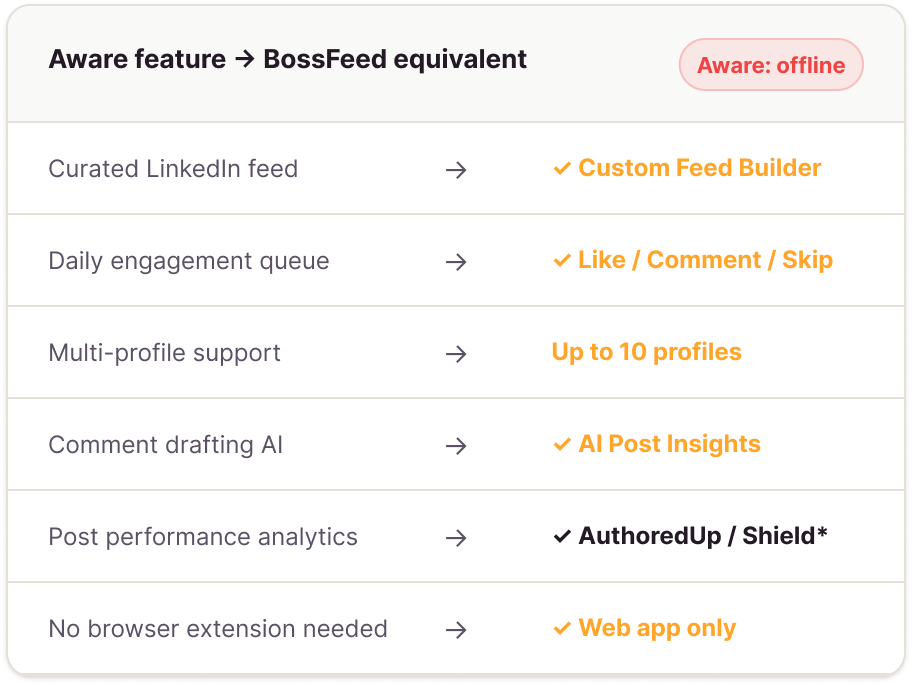
If you used Aware, you know what you're looking for. Here's exactly how BossFeed maps to every feature you relied on — and where it goes further.
One honest note: Aware had native LinkedIn analytics — post reach, follower growth, engagement rate trends. BossFeed currently focuses on the engagement workflow, not analytics. For LinkedIn analytics, we recommend pairing BossFeed with AuthoredUp orShield or Shield — both do analytics well. BossFeed does engagement well.
| Feature | Aware had it | BossFeed |
|---|---|---|
Curated feed of tracked profiles See only posts from people you chose — no algorithm | Same feature | |
Daily engagement queue (triage workflow) Work through posts: engage or skip, one by one | Like / Comment / Skip | |
Multiple LinkedIn profile management Manage more than one profile from one login | Up to 10 profiles | |
AI comment assistance Help writing substantive, contextual comments | Basic drafting | Post Intelligence |
Engagement history Record of who you've engaged with and when | ||
Web app (no Chrome extension required) Full product runs in browser, no installation | ||
Post performance analytics Your post reach, impressions, follower growth trends | Use AuthoredUp/Shield | |
AI post insights (context, angles, thread summary) Intelligence about a post before you comment on it | — | BossFeed exclusive |
* For LinkedIn analytics, we recommend AuthoredUp (authoredup.com) or Shield(shieldapp.ai) — both pair well with BossFeed as your engagement layer. | ||
At Aware alternatives compared:
the honest breakdown.
You deserve a real comparison, not a sales page. Here's every meaningful UseAware alternative on the market — what each is good for, and where each one falls short.
We'd rather help you find the right tool than trick you into the wrong one.
Closest to Aware
BossFeed
Engagement Workflow Tool
The most direct functional replacement for Aware's core loop: curated feed + daily triage + multi-profile support. Adds AI post insights that Aware never had. Web app — no extension.
Doesn't replicate Aware's post analytics. Focus is the engagement workflow, not performance measurement.
From $19/mo · 7-day free trial
Taplio
Content Scheduling + Creation
Best-in-class for writing, scheduling, and publishing LinkedIn posts. Strong AI writing assistant. Good analytics. Large user base with a social feed feature.
Taplio's engagement feed is secondary to its publishing workflow. The like/comment/skip triage experience Aware offered simply isn't what Taplio is built for.
From $39/mo
Commenter.ai
AI Comment Automation
Automates LinkedIn commenting using AI — generates and posts comments on your behalf with minimal intervention. Popular with volume-focused users.
Automated comments are increasingly detectable by LinkedIn's 2026 algorithm updates. Risk of comments sounding generic or mismatched to the post. Different philosophical approach to Aware's human-guided workflow.
From $19/mo
MyFeedIn
Feed Curation · Chrome Extension
The most direct feed curation alternative. Lets you build a custom LinkedIn feed of chosen profiles. Lightweight, affordable, with an active user base.
Chrome extension only (not a web app). No triage workflow — it's a reading tool, not an engagement system. No AI post insights. No multi-profile support.
$9/mo
| Feature | BossFeed | Taplio | Commenter.ai | MyFeedIn |
|---|---|---|---|---|
Curated feed of chosen profiles The core Aware feature | — | — | ||
Daily engagement triage workflow Like / Comment / Skip queue | — | — | — | |
AI comment assistance Help writing comments | Drafting only | Auto-posts for you | — | |
Multiple LinkedIn profiles One login, all profiles | — | Paid plans | — | |
Post scheduling & publishing Write and schedule LinkedIn posts | — | — | — | |
Post analytics & follower tracking Reach, impressions, growth trends | —* | Limited | — | |
Web app (no extension required) Works in any browser | Extension only | |||
LinkedIn ToS compliant Safe for your account long-term | Risk | |||
| Verdict | Best for engagement | Best for publishing | Volume comments | Feed reading |
* BossFeed focuses on engagement workflow. For analytics, we recommend AuthoredUp or Shield alongside BossFeed.
Why BossFeed
The Aware engagement workflow, rebuilt for 2026.
BossFeed wasn't built to be a generic "LinkedIn tool." It was built specifically around the daily engagement habit that made Aware worth paying for.
1
Same workflow philosophy, cleaner execution
Aware's genius was the triage approach: don't scroll, work a queue. BossFeed keeps that philosophy and adds a third option (Like, without commenting) that makes the morning routine even faster.
2
AI insights, not AI automation
Aware helped you write better comments. BossFeed's AI Post Intelligence goes further — it tells you what the post is arguing, who wrote it, and what the comment thread looks like before you write a word. You still write the comment. It just sounds like you at your best.
3
Built to be ToS-compliant by design
Aware shut down partly due to LinkedIn's compliance crackdown. BossFeed is architected around the workflow layer only — no automated posting, no data scraping, no API violations. It's a durable tool, not a shortcut waiting to get your account flagged.
4
Multi-profile from day one
Managing multiple LinkedIn profiles was one of Aware's most-used features — and one of the rarest capabilities in the market. BossFeed supports up to 10 profiles on the Agency plan, each with their own feed, queue, and history.
Start your first BossFeed session in 5 minutes.
You know what you're looking for — you've used Aware. BossFeed's setup is fast: connect your LinkedIn, add your first 10 profiles, and your curated feed is live.
'/%3e%3cg%20clip-path='url(%23clip0_792_24758)'%3e%3cpath%20d='M4%208L6.5%2010.5L12%205'%20stroke='%23FFA62A'%20stroke-width='1.5'%20stroke-linecap='round'%20stroke-linejoin='round'/%3e%3c/g%3e%3cdefs%3e%3cclipPath%20id='clip0_792_24758'%3e%3crect%20width='10'%20height='10'%20fill='white'%20transform='translate(3%203)'/%3e%3c/clipPath%3e%3c/defs%3e%3c/svg%3e) Curated feed live in under 5 minutes
Curated feed live in under 5 minutes- No extension to install — runs in your browser
- Import your Aware profile list from a CSV or LinkedIn export
- 7-day free trial, no credit card required
- Cancel any time
How to migrate from Aware to BossFeed.
Aware accounts are offline, so there's no direct data export. Here's the
fastest way to rebuild your workflow in BossFeed.
Step 01
Export your LinkedIn connections
Go to LinkedIn Settings → Data Privacy → Get a copy of your data → select "Connections." LinkedIn will email you a CSV of all your connections with names and job titles.
Usually arrives within 10 minutes.
Step 02
Identify your top 50 - 200 profiles
From your connections export (or from memory), identify the people you were tracking in Aware: key clients, active prospects, referral partners, thought leaders you want to stay visible with.
Start with your top 30 — you can always add more later.
Step 03
Add them
to BossFeed
In BossFeed, add each profile by LinkedIn URL or by searching their name. BossFeed immediately begins pulling their posts into your curated feed — no waiting for data to populate.
Add profiles by LinkedIn URL for the fastest setup.
Step 04
Run your
first daily queue
Your BossFeed is live. Open your daily queue, work through it with Like / Comment / Skip, and let BossFeed's AI Post Insights help you engage with more substance than you could in Aware.
First session is usually the best — you'll see immediately what you missed.
Recovering your Aware engagement history: Unfortunately, Aware's user data is no longer accessible after the August 2025 shutdown. If you kept notes or used a spreadsheet alongside Aware, you can use those to rebuild your context. BossFeed's engagement history will begin logging your activity from day one of your account.
Aware alternative: common questions.
What happened to Aware (UseAware)? Why did it shut down?
Aware shut down on August 31, 2025. Founder Alex Boyd cited concerns about LinkedIn's increasingly strict API restrictions and Terms of Service compliance as the reason for the shutdown. Users received approximately one month's notice. All user data — feeds, engagement history, tracked profiles — became inaccessible on the shutdown date. Boyd described building Aware to solve 'the tedious and time-consuming work of engaging with certain people's posts' — which is exactly the problem BossFeed is also built to solve.
Is BossFeed the closest Aware alternative?
Based on our analysis of the available alternatives, yes — BossFeed is the most functionally similar replacement for Aware's core engagement workflow. The key features that made Aware valuable (curated feed, daily triage, multi-profile support, AI comment assistance) are all present in BossFeed. The main gap is post analytics — Aware had native LinkedIn analytics that BossFeed currently doesn't offer. For analytics, we recommend AuthoredUp or Shield alongside BossFeed.
Can I import my Aware profile list into BossFeed?
Aware's servers are offline, so there's no direct data export available. However, if you remember the key people you were tracking (or have any notes), you can add them to BossFeed by LinkedIn URL. The fastest reconstruction path: export your LinkedIn connections from LinkedIn Settings → Data Privacy → Get a copy of your data, then identify the profiles you want to track and add them to BossFeed in bulk. Most former Aware users have their core list rebuilt in under 20 minutes.
Why did Taplio and Commenter.ai end up on "best Aware alternatives" lists?
Those lists were written by tools that had their own products to recommend. Taplio is an excellent LinkedIn publishing tool — but it doesn't replicate Aware's engagement triage workflow, which was Aware's core value. Commenter.ai automates comments on your behalf — a fundamentally different approach to what Aware offered (which was a human-guided workflow, just with better tooling). If you used Aware for its daily engagement queue and curated feed, those tools are filling a different need.
Is BossFeed safe to use after LinkedIn's ToS crackdowns?
Yes. BossFeed is designed specifically to be ToS-compliant by architecture. It does not automate any LinkedIn actions on your behalf — no automated likes, comments, connection requests, or messages. It does not scrape LinkedIn data in violation of platform rules. All engagement actions are performed by you, manually. BossFeed is a workflow interface that sits alongside LinkedIn, not a bot that acts on your behalf. This is the same compliance model that tools like Notion or Loom use — they help you do your work, they don't do it for you.
What's different about BossFeed's AI vs. Aware's comment drafting?
Aware offered basic AI comment drafting — it would suggest a comment you could edit and post. BossFeed takes a different approach with AI Post Intelligence: instead of writing the comment for you, BossFeed surfaces context about the post before you write — what the author is arguing, what the comment thread looks like, what angles a high-value response might take. You write the comment. The AI makes sure it sounds like you at your best, not a generic bot reply. This matters more in 2026, when LinkedIn's algorithm actively detects and deprioritizes generic AI-generated comments.
Your Aware workflow
lives on in BossFeed.
The daily ritual you built with Aware — curated feed, morning triage, purposeful engagement — starts again in BossFeed. Rebuilt. Faster. With AI insights Aware never had.
- 7-day free trial
- ·
- No credit card
- ·
- LinkedIn-ToS compliant
- ·
- Setup in 5 minutes